Showing posts with label oracle. Show all posts

Monday, October 3, 2011

Recreate GRANTS to user in oracle without dba privilege

If you want to get list of grants made to tables and you want to recreate the user permissions in a different environment, the easy way to generate a script is to use the dbms_metadata.get_granted_ddl function as described here. However, if you do not have DBA privilege on the database you will not be able to use that method. Here is a simple sql that you can use to generate a script that will work in most common situations. This just relies on the TABLE_PRIVILEGES table.
select replace('GRANT ' || decode(select_priv,'Y','SELECT','') || decode(insert_priv,'A',',INSERT','') || decode(delete_priv,'Y',',DELETE','') || decode(update_priv,'Y',',UPDATE','') || decode(references_priv,'Y',',REFERENCES','') || decode(alter_priv,'Y',',ALTER','') ||' ON '|| owner || '.' || table_name || ' TO ' || GRANTEE ||';','GRANT ,','GRANT ') from TABLE_PRIVILEGES where owner= 'OWNER' order by table_name, grantee;

Thursday, February 11, 2010

How to get UTM/MGRS from Latitude/Longitude using Oracle

Oracle Spatial queries can be used to derive the UTM/MGRS from a given Latitude and Longitude.
The following sql provides an example on how to get the UTM/MGRS
Select SDO_CS.to_USNG( SDO_GEOMETRY(2001,8307,SDO_POINT_TYPE(41.98,33.23,NULL),NULL,NULL), 1) UTM_MGRS from dual;
 For more information on oracle spatial features, refer to http://www.oracle.com/technology/products/spatial/pdf/10gr2_collateral/locator_twp_10gr2.pdf

Oracle Locator vs Spatial

Oracle Locator Oracle Spatial

Free  included in oracle 10G onwards
What Can Oracle Locator Do for You?
Query nearest neighbor and other spatial relationships between geometries
Perform location queries on relational information not stored in Oracle Spatial geometry
Support long transactions
Store and index vector geometries in the database
Enhance application performance
http://www.oracle.com/technology/products/spatial/pdf/10gr2_collateral/locator_twp_10gr2.pd
    Additional option on top of oracle database
      What Can Oracle Spatial Do for You?
      Everything that Oracle Locator does, and:
      Perform length and area calculations on geometries
      Generate new geometries such as buffers and unions
      Perform coordinate systems transformations, for individual geometries or entire layers
      Store linear measure information
      http://www.oracle.com/technology/products/spatial/pdf/10gr2_collateral/spatial_twp_10gr2.pdf

      Wednesday, February 10, 2010

      Using Oracle ESB as a web service client to pull data periodically

      In this article we will cover the detailed steps to create an ESB service that invokes a web service periodically and write the response to a file.  The web service in this case takes an input parameter and returns some response based on the input.  The client is expected to parse the response and take an element from the response and supply that as the input for the next call.
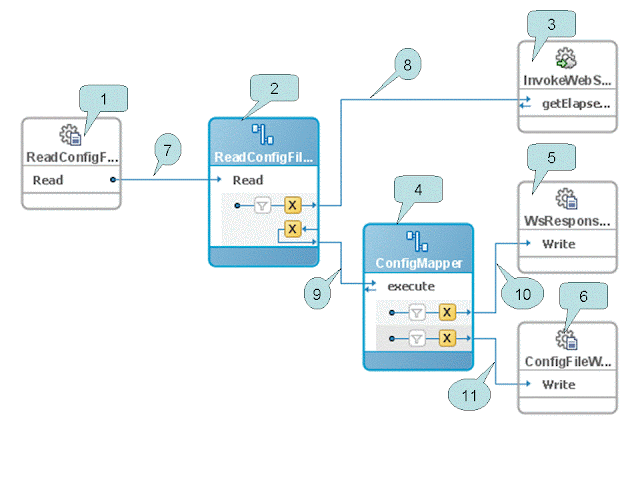
      1.    Create a service group. Lets call it EsbWebServiceClient
      2.    Create a xsd file to represent the configuration information that we will use to pass to the webservice.
      3.    Create a xml file that complies with the schema and the initial parameters for invoking the web service. The ESB adaptor will update this file after each invocation.
      4.    Create a file adaptor to read a file.  Don’t check the mark that says delete file after reading.  Specify the schema that you created in step 2 for the schema of the file. When you are done with step you should end up with boxes 1 & 2 shown in the diagram with the line connecting them.
      5.    Create a ESB Service  for Soap service (Right click on design pane-> Create ESB Service->Soap Service)  On the pop up window, select the WSDL file representing the service.  For this demo, the web service is a simple service that takes a string as input and returns a string. This creates Box 3.with no lines connected.
      6.    Now create a schema that represents the input elements to the webservice and the output of the webservice.  We will use this as the holding area to have both the request and response so we can write the output to a file and update the config file with the updated information.  In the example the schema is called serviceParameterAndResponse.
      7.    Create a ESB routing Service and name it ConfigMapper.(Right click on design pane-> Create ESB Service->Routing Service)  On the pop up window, select the serviceParameterAndResponse schema for both request and response formats.. This creates Box 4.with no lines connected. This routing service provides the framework for us to merge the input parameters and the webservice output.
      8.    Now create a file adaptor that can write an output file and name it WsResponseWriter. To keep it simple, specify the schema for the file as the same as the response from the webservice  This should create Box 5 with no lines connected.
      9.    Now create a file adaptor that can write the config file and name that ConfigFileWriter.. Specify the schema and the location for the file as the same as the schema created in step 2. This should create Box 6 with no connector lines
      10.    Double click box 2 and add a routing rule to invoke the method on the webservice.  This should create a reply line.  Now point the reply to the execute method on the routing service created on step 7.  This should create lines 8 & 9 on the esb diagram..
      11.    Double click box 4 and add two routing rules.  One pointing to WsResponseWriter and the second one pointing to ConfigFileWriter.  This should create the lines 10 & 11 in the diagram.
      12.    Now the diagram is almost complete.  You will see the mappings are still gray. We will add the mappings which will make them yellow.
      13.    Double click on the top "X" and create a new mapping.  When the designed is displayed, drag a line from the config parameter to the input parameter of the web service.
      14.    Double click of the bottom "X" of box 2.  Create a new mapping.  You will notice there is an option to "include the request in reply play load".  Make sure you select this option.  When the designer panel is displayed you should see a new node called “ESBREQUEST” on the left hand side.  To learn more about the $ESBREQUEST parameter refer to this article (http://www.soastation.org/2007/05/esbrequest-in-oracle-esb-routing.html)
      15.    Now select the source view of the xslt and add a function to parse the required fields from the request to map to the output. In the example below, I have mapped the string after the pipe symbol to be stored as the parameter for the next call. And for the response, I have concatenated the input and the output to be written out to the file.  Please note that you will not be able to drat lines to or from the $ESBREQUEST variable on the designer view.
      <xsl:param name="ESBREQUEST"/>
       <xsl:template match="/">
         <out1:serviceParameterAndResponse>
           <out1:param1>
             <xsl:value-of select='substring-after(/tns:getElapsedTimeSinceResponse/tns:return,"|")'/>
           </out1:param1>
           <out1:response>
             <xsl:value-of select='concat(substring-after(/tns:getElapsedTimeSinceResponse/tns:return,"|"),substring($ESBREQUEST/tns:lastTime,1.0,2.0))'/>
           </out1:response>
         </out1:serviceParameterAndResponse>
       </xsl:template>
       16.    Now double click on the "X" on box 4 and create new mappings.   These mappings should be straightforward as all the manipulation is done on the previous step.   Just draw a straight line from the corresponding field on the left to right.  Repeat this for both the ‘X” on the box.
      17.    Now your diagram should look similar to the one shown above.  You can register the service to your ESB and test it.

      If you like see a copy of the project that I used to create the demo, feel free to drop me an email.  My email address is jmeslie at gmail dot com.

      Monday, October 19, 2009

      Oracle - Generate a list of dates with time

      I had to create a report that had to have a line for each date/time within the given range, even if the actual data did not have value for that date. Say, web trafic count for each 5 minutes for a given day. The simple full join of the date will not work for this because, there might be periods during the day there was no user activity, and it is expected to have zeroes in that case.

      A simple approach would be to use the hirerical query used in this blog if you only need one row per date. But if you need date entries for multiple times per day, say a row for every 5 minutes, the following function will come in handy. It uses a Pipelined Table Function.

      CREATE OR REPLACE TYPE date_array AS TABLE OF DATE;
      /
      CREATE OR REPLACE FUNCTION MPI2.date_table(sdate DATE, edate DATE, mi_interval integer )

      RETURN date_array PIPELINED is
      fDate date ;
      BEGIN
      fDate := sdate;
      while fDate < edate LOOP
      PIPE ROW(fDate );
      fDate := fDate + mi_interval / 1440;
      END LOOP;
      RETURN;
      END date_table;

      Now you may query this function just like you query a table, as follows

      SELECT to_char(column_value,'DD-MON-YYYY HH24:MI') FROM TABLE(CAST(MPI2.DATE_TABLE(trunc(sysdate-1),sysdate,5) AS date_array));

      The above query will return a row for every 5 minutes. You can do a full join of this table with your actual tables to get the result you wanted.

      Monday, April 20, 2009

      Oracle Webservice Manager (OWSM) admin password change utility

      Recently we had to change the admin password for the OWSM admin user due to security policy. I was surprised that oracle does not provide any tool/procedure to change the password of the OWSM admin users. The procedure they described in Metalink basically calls for creating a temporary user, then copying the encrypted password of that user to the admin user by executing a sql statement and deleting the temporary user.

      So, I took a little bit more digging in to the scripts and came up with a java program update the password of the admin user without having to go through all the round about ways.

      You can download the script from here and expand the zip file. The readme.txt file has the instructions how to execute the command. It basically involved, updating a property file with the userid/password information and executing a java command line.

      If you are curious about the java program and like a copy of the source code, I will be happy to share. Just drop me a line at jmeslie at gmail dot com.

      Friday, February 13, 2009

      Oracle function to aggregate a number by date

      One of the common scenarios while working with relational database tables is to aggregate a column on a table and find out the corresponding value of a different column. For example, if you have a table that has the name, location and checkin time of all employees in a table and and you want to find out the location from which each employee ckecked in last, the sql will involve creating a inner query. For most cases, an inner query is fine. However, if the table has a huge number of rows querying the table twice might be expensive. That is when a custom aggregate function might be helpful.
      Here is the sql that represents the table:

      CREATE TABLE EMP_TIME_LOG
      (
      REPORT_ID NUMBER(5),
      LOCATION_ID NUMBER(2),
      LOGIN_DTG DATE DEFAULT sysdate,
      EMP_NAME VARCHAR2(50 BYTE)
      )
      /

      SET DEFINE OFF;
      Insert into EMP_TIME_LOG
      (REPORT_ID, LOCATION_ID, LOGIN_DTG, EMP_NAME)
      Values
      (1, 1, TO_DATE('02/13/2008 13:35:59', 'MM/DD/YYYY HH24:MI:SS'), 'emp1');
      Insert into EMP_TIME_LOG
      (REPORT_ID, LOCATION_ID, LOGIN_DTG, EMP_NAME)
      Values
      (2, 1, TO_DATE('02/13/2008 13:36:23', 'MM/DD/YYYY HH24:MI:SS'), 'emp2');
      Insert into EMP_TIME_LOG
      (REPORT_ID, LOCATION_ID, LOGIN_DTG, EMP_NAME)
      Values
      (3, 2, TO_DATE('02/13/2008 13:36:50', 'MM/DD/YYYY HH24:MI:SS'), 'emp1');
      Insert into EMP_TIME_LOG
      (REPORT_ID, LOCATION_ID, LOGIN_DTG, EMP_NAME)
      Values
      (4, 2, TO_DATE('02/13/2008 13:37:32', 'MM/DD/YYYY HH24:MI:SS'), 'emp3');
      Insert into EMP_TIME_LOG
      (REPORT_ID, LOCATION_ID, LOGIN_DTG, EMP_NAME)
      Values
      (5, 4, TO_DATE('02/13/2008 13:45:48', 'MM/DD/YYYY HH24:MI:SS'), 'emp3');
      COMMIT;

      In this example we need to get group the rows by employee name but we want to get the latest checkin time and the location_id of the row corresponding to the latest checkin time. Without using any custom function here is how one might achieve this.
      select t1.emp_name , t1.location_id from emp_time_log T1 ,
      (select location_id, emp_name, max(login_dtg) max_login_dt from emp_time_log group by emp_name,location_id ) T2
      where t1.emp_name = t2.emp_name and t2.max_login_dt = t1.LOGIN_DTG

      Oracle supports a feature called User-Defined Aggregate Functions that makes this very easy to implement. If we had a custom aggregate function that can take both the location id and the login_dtg and returned the location_id of the row corresponding to the max(login_dtg) of each group, we could eliminate the inner query. However, for aggregate functions there is limit on the number of arguments that can be passed in. Fortunately, we could create a custom data type that can hold both the values and use that custom type as a parameter to the aggregate function. With a custom function, the query to achieve the same result would look like the following.
      select emp_name , MAX_DATES_NUMBER (NUMBER_DATE (location_id, login_dtg)) as location_id from emp_time_log group by emp_name

      Here NUMBER_DATE is the custom data type that I created to hold both the number and a date, and MAX_DATES_NUMBER is the custom aggregate function.
      The function definition is as follows:

      CREATE OR REPLACE FUNCTION MAX_DATES_NUMBER
      ( idDtVal Number_Date
      ) RETURN NUMBER
      PARALLEL_ENABLE
      AGGREGATE USING Number_Date;
      /

      The code for creating the custom data type and the the logic for implementing the aggregation function is given below. Jonathan Gennick has written a nice article "Build Custom Aggregate Functions" that explains who the custom aggregation function works. I encourage you to read that article.

      CREATE OR REPLACE TYPE Number_Date
      AS OBJECT (

      maxId NUMBER,
      maxDt DATE,

      STATIC FUNCTION ODCIAggregateInitialize
      ( actx IN OUT Number_Date
      ) RETURN NUMBER,

      MEMBER FUNCTION ODCIAggregateIterate
      ( self IN OUT Number_Date,
      idDtVal IN Number_Date
      ) RETURN NUMBER,

      MEMBER FUNCTION ODCIAggregateTerminate
      ( self IN Number_Date,
      returnValue OUT NUMBER,
      flags IN NUMBER
      ) RETURN NUMBER,

      MEMBER FUNCTION ODCIAggregateMerge
      (self IN OUT Number_Date,
      ctx2 IN Number_Date
      ) RETURN NUMBER

      );
      /

      CREATE OR REPLACE TYPE BODY Number_Date AS

      STATIC FUNCTION ODCIAggregateInitialize
      ( actx IN OUT Number_Date
      ) RETURN NUMBER IS
      BEGIN
      IF actx IS NULL THEN
      actx := Number_Date (0,'01-JAN-1900');
      ELSE
      actx.maxDt := '01-JAN-1900';
      actx.maxId := 0;
      END IF;
      RETURN ODCIConst.Success;
      END;

      MEMBER FUNCTION ODCIAggregateIterate
      ( self IN OUT Number_Date,
      idDtVal IN Number_Date
      ) RETURN NUMBER IS
      BEGIN
      IF idDtVal.maxDt > self.maxDt THEN
      self.maxId := idDtVal.maxId;
      self.maxDt := idDtVal.maxDt;
      END IF;
      RETURN ODCIConst.Success;
      END;

      MEMBER FUNCTION ODCIAggregateTerminate
      ( self IN Number_Date,
      ReturnValue OUT NUMBER,
      flags IN NUMBER
      ) RETURN NUMBER IS
      BEGIN
      returnValue := self.maxId;
      RETURN ODCIConst.Success;
      END;

      MEMBER FUNCTION ODCIAggregateMerge
      (self IN OUT Number_Date,
      ctx2 IN Number_Date
      ) RETURN NUMBER IS
      BEGIN
      IF ctx2.maxDt > self.maxDt THEN
      self.maxId := ctx2.maxId;
      self.maxDt := ctx2.maxDt;
      END IF;

      RETURN ODCIConst.Success;
      END;

      END;
      /

      Sunday, November 23, 2008

      Where to find Oracle ESB documentation

      Here is a list of ESB documentation files I found useful. You can check them out at http://www.technogemsinc.com/clientFile/esb.htm

      For details about configuring the AQ, database, file, FTP, JMS, and MQ adapters in Oracle JDeveloper, see Oracle Application Server Adapter for Files, FTP, Databases, and Enterprise Messaging User's Guide. For details about configuring the Oracle application adapter for Oracle E-Business Suite, see Oracle Application Server Adapter for Oracle Applications User's Guide.

      Tuesday, July 1, 2008

      Struts/Tiles/oc4j logging

      Recently I was troubleshooting an issue with a web application that uses struts/tiles and runs in an oc4j container. I application was getting a exception and oc4j will not print the exception stack trace in the output. It was hard to understand what is going on and it took me a while to figure out. So I am documenting here the process, so it can be a handy reference next time around or for some one who comes across the same issue.

      To understand what was going on, the first step was to see what was the exception. To do this I set the development mode to true in the global_application.xml file. The global-web-application.xml file can be found under %ORACLE_HOME%/j2ee/%instance%/config/global-web-application.xml. Update the development attrubute on the orion-web-app tag to true and restart the instance.

      <orion-web-app development="true" xsi="http://www.w3.org/2001/XMLSchema-instance" nonamespaceschemalocation="http://xmlns.oracle.com/oracleas/schema/orion-web-10_0.xsd" directory="./persistence" webdir="/servlet" timeout="0" tlds="false" version="0">


      Now, if you visit the page on the browser, you will see the stack trace on the browser. This is a handy method, if your log files are cluttered. Alternatively you may view the stacktrace in the log files if you have configured oc4j to print standard out and error to a file. (for more information on how to setup refer to my earlier entry)

      In my current situation, the stacktrace was not very useful as it did not point to any application code directly. The following is the stacktrace I received.


      [ ERROR] [2008-07-01 09:23:13,500] [AJPRequestHandler-HTTPThreadGroup-5:] {{ServletException in '/StrutsAction2.do?QueryParm=parmvalue': null}} [org.apache.struts.taglib.tiles.InsertTag]
      javax.servlet.ServletException: Error in servlet
      at com.evermind.server.http.ServletRequestDispatcher.invoke(ServletRequestDispatcher.java:757)
      at com.evermind.server.http.ServletRequestDispatcher.unprivileged_include(ServletRequestDispatcher.java:160)
      at com.evermind.server.http.ServletRequestDispatcher.access$000(ServletRequestDispatcher.java:50)
      at com.evermind.server.http.ServletRequestDispatcher$1.oc4jRun(ServletRequestDispatcher.java:97)
      at oracle.oc4j.security.OC4JSecurity.doPrivileged(OC4JSecurity.java:283)
      at com.evermind.server.http.ServletRequestDispatcher.include(ServletRequestDispatcher.java:102)
      at com.evermind.server.http.EvermindPageContext.include(EvermindPageContext.java:396)
      at com.evermind.server.http.EvermindPageContext.include(EvermindPageContext.java:349)
      at org.apache.struts.tiles.TilesUtilImpl.doInclude(TilesUtilImpl.java:101)
      at org.apache.struts.tiles.TilesUtil.doInclude(TilesUtil.java:137)
      at org.apache.struts.taglib.tiles.InsertTag.doInclude(InsertTag.java:758)
      at org.apache.struts.taglib.tiles.InsertTag$InsertHandler.doEndTag(InsertTag.java:890)
      at org.apache.struts.taglib.tiles.InsertTag.doEndTag(InsertTag.java:460)
      at _layouts._template._jspService(_template.java:324)
      at com.orionserver.http.OrionHttpJspPage.service(OrionHttpJspPage.java:59)
      at oracle.jsp.runtimev2.JspPageTable.service(JspPageTable.java:453)
      at oracle.jsp.runtimev2.JspServlet.internalService(JspServlet.java:591)
      at oracle.jsp.runtimev2.JspServlet.service(JspServlet.java:515)
      at javax.servlet.http.HttpServlet.service(HttpServlet.java:856)
      at com.evermind.server.http.ServletRequestDispatcher.invoke(ServletRequestDispatcher.java:711)
      at com.evermind.server.http.ServletRequestDispatcher.forwardInternal(ServletRequestDispatcher.java:368)
      at com.evermind.server.http.ServletRequestDispatcher.unprivileged_forward(ServletRequestDispatcher.java:259)
      at com.evermind.server.http.ServletRequestDispatcher.access$100(ServletRequestDispatcher.java:50)
      at com.evermind.server.http.ServletRequestDispatcher$2.oc4jRun(ServletRequestDispatcher.java:193)
      at oracle.oc4j.security.OC4JSecurity.doPrivileged(OC4JSecurity.java:283)
      at com.evermind.server.http.ServletRequestDispatcher.forward(ServletRequestDispatcher.java:198)
      at org.apache.struts.action.RequestProcessor.doForward(RequestProcessor.java:1056)
      at org.apache.struts.tiles.TilesRequestProcessor.doForward(TilesRequestProcessor.java:261)
      at org.apache.struts.tiles.TilesRequestProcessor.processTilesDefinition(TilesRequestProcessor.java:237)
      at org.apache.struts.tiles.TilesRequestProcessor.processForwardConfig(TilesRequestProcessor.java:300)
      at org.apache.struts.action.RequestProcessor.process(RequestProcessor.java:231)
      at org.apache.struts.action.ActionServlet.process(ActionServlet.java:1164)
      at org.apache.struts.action.ActionServlet.doPost(ActionServlet.java:415)
      at javax.servlet.http.HttpServlet.service(HttpServlet.java:763)
      at javax.servlet.http.HttpServlet.service(HttpServlet.java:856)
      at com.evermind.server.http.ServletRequestDispatcher.invoke(ServletRequestDispatcher.java:711)
      at com.evermind.server.http.ServletRequestDispatcher.forwardInternal(ServletRequestDispatcher.java:368)
      at com.evermind.server.http.HttpRequestHandler.doProcessRequest(HttpRequestHandler.java:866)
      at com.evermind.server.http.HttpRequestHandler.processRequest(HttpRequestHandler.java:448)
      at com.evermind.server.http.AJPRequestHandler.run(AJPRequestHandler.java:302)
      at com.evermind.server.http.AJPRequestHandler.run(AJPRequestHandler.java:190)
      at oracle.oc4j.network.ServerSocketReadHandler$SafeRunnable.run(ServerSocketReadHandler.java:260)
      at com.evermind.util.ReleasableResourcePooledExecutor$MyWorker.run(ReleasableResourcePooledExecutor.java:303)
      at java.lang.Thread.run(Thread.java:595)


      As you can see, all I can see is it getting a null exception when the jvm is trying to process the request for StrutsAction2. Unfortunately it was not printing the application class that was causing the exception. The reason for the issue is the exception is happening in a different thread than the one the stacktrace is printed.
      Here is what was happening. I was actually calling url accociated with StrutsAction1. The tile definition for the StrutsAction1 includes StrutsAction2 in its response. The stacktrace oc4j was printing was from the thread that was processing StrutsAction2 which is a seperate thread. The only clue I could get from here is that the error is occoring during StrutsAction2. If I try to invoke StrutsAction2 directly it seems to be working fine.

      This made things a bit more complex and I started adding more and more debugging statements to the strutsaction2. Then I realized there is a Custom tiles plugin we have defined for the app and it had a debug statement. On the outlook, the debug statement looked harmless to me. However, I was a bit surprised by the fact that I was not even seeing the debugline on the logfile even after turning debug on.

      Here is the debug statement.


      Logger.debug("Processing Request: " + request.getContextPath() + request.getServletPath() +" Req Detail: " + getLogString(request));

      private String getLogString (HttpServletRequest req) {
      StringBuffer buf = new StringBuffer("Request Parms:");
      Enumeration parms = req.getParameterNames() ;
      if (parms != null) {
      while ( parms.hasMoreElements() ) {
      String parm = parms.nextElement() ;
      String pVal = req.getParameter(parm);
      buf.append(parm + "=" + pVal + ";");
      }
      }
      buf.append(": Req Headers: ");
      Enumeration headers = req.getHeaderNames() ;
      if (headers != null ) {
      while ( headers.hasMoreElements() ) {
      String parm = headers.nextElement() ;
      String pVal = req.getHeader(parm);
      buf.append(parm + "=" + pVal + ";");
      }
      }

      Enumeration attribs = req.getAttributeNames() ;
      if(attribs != null) {
      while ( attribs.hasMoreElements() ) {
      String parm = attribs.nextElement() ;
      Object pVal = req.getAttribute(parm);
      buf.append(parm + "=" + pVal.toString() + ";");
      }
      }
      return buf.toString();
      }


      Not seeing the debug line in the log provided me the next clue. The issue might be somewhere in the debug statement. I came to the conclusion because this debug statement was the first thinging happening in the preprocess method for the plugin.

      So my next step is to add a try catch around the debug line and printed the stacktrace in case of ecxeption. This pointed to the bug in the getLogString method. It was the line getting the attribute value "pVal.toString()" as the specific call flow, it was running in to an attribute that had a null value.

      So I added a null check to the line as follows to get going. This was interesting beacause the common code that was suposed to be helping with debug was itself the one causing the bug. The leason here is be extra carefull with debug statements especially when adding to comon code.

      buf.append(parm + "=" + (pVal==null?"null":pVal.toString()) + ";");"

      Tuesday, April 29, 2008

      OC4J JDBC Connection Pool issue with ResultSet.getStatement()

      Recently one our customers migrated their application from Tomcat to OC4J container and noticed some interesting observations regarding JDBC connection pool. I thought I would share here as it will help others too.

      The Issue:
      After migrating the application to OC4J, the number of connections to the database held by the enterprise manager did not match with the actual connections held in the database. The customer had Interscope's Wily product and it reported a different number for the number of database connections.

      The application's heap usage also goes up significantly as it the conection objects are not released.

      This lead us to evaluate the application's code on how they are getting the connection and releasing it. The way they were getting the connection was in line with the typical usage. However, when they are releasing the connection, they are going it by getting the connection object through the reference from the resultset object. They were using a utility method sibilar to the one below.


      protected synchronized Connection getConn() {
      Connection conn = null;
      try {
      Context initContext = new InitialContext();

      DataSource ds = (DataSource)initContext.looku("dataSourceName");
      conn = ds.getConnection();

      } catch (Exception e) {
      Logger.error("Error in getting a JDBC " + "connection " + e.getMessage());
      }
      return conn;
      }

      public synchronized void closeResultSetAndItsAssoc(ResultSet rs) {
      if (rs != null) {
      try {

      Statement stmt = rs.getStatement();
      Connection conn = stmt.getConnection();

      if (rs != null) {
      try { rs.close(); } catch (SQLException ignore) {}
      }
      if (stmt != null) {
      try { stmt.close(); } catch (SQLException ignore) {}
      }
      if (conn != null) {
      try { conn.close(); } catch (SQLException ignore) {}
      }
      } catch (SQLException ignore) {
      appLogger.warn(ignore.getMessage());
      }
      }

      }


      This code snippet worked well with Tomcat container. However, with the OC4J container, the actual connection object obtained by the getConn() method above is different from the one obtained by the stmt.getConnection() method. So, it appeared to the connection pool manager that the applicatio never closed the connection. Interestingly the one obtained by the stmt.getConnection() method is the actual physical connection and we would notice the connection is closed at the database rather than going back to inactive state.

      Luckily, they were using the getConn() method and the closeResultSetAndItsAssoc() methods from the same object. We were able to make a quick fix to the closeResultSetAndItsAssoc method by closing the connection reference obtained using the getConn() method.

      Tuesday, April 22, 2008

      What is going on with DATE and TIMESTAMP?

      I have ran in to developers using java.sql.Date object in Oracle and wondering why the date object does not contain the time information. The short answer is java.sql.Date and you need to use the java.sql.TimeStamp object that contains both Date and timestamp information.

      A detailed explanation of the issue can be found in the Oracle web site . I am copying the text here for a quick reference.

      Prior to 9.2, the Oracle JDBC drivers mapped the DATE SQL type to java.sql.Timestamp. This made a certain amount of sense because the Oracle DATE SQL type contains both date and time information as does java.sql.Timestamp. The more obvious mapping to java.sql.Date was somewhat problematic as java.sql.Date does not include time information. It was also the case that the RDBMS did not support the TIMESTAMP SQL type, so there was no problem with mapping DATE to Timestamp.

      In 9.2 TIMESTAMP support was added to the RDBMS. The difference between DATE and TIMESTAMP is that TIMESTAMP includes nanoseconds and DATE does not. So, beginning in 9.2, DATE is mapped to Date and TIMESTAMP is mapped to Timestamp. Unfortunately if you were relying on DATE values to contain time information, there is a problem.

      There are several ways to address this problem:

      Alter your tables to use TIMESTAMP instead of DATE. This is probably rarely possible, but it is the best solution when it is.

      Alter your application to use defineColumnType to define the columns as TIMESTAMP rather than DATE. There are problems with this because you really don't want to use defineColumnType unless you have to (see What is defineColumnType and when should I use it?).

      Alter you application to use getTimestamp rather than getObject. This is a good solution when possible, however many applications contain generic code that relies on getObject, so it isn't always possible.

      Set the V8Compatible connection property. This tells the JDBC drivers to use the old mapping rather than the new one. You can set this flag either as a connection property or a system property. You set the connection property by adding it to the java.util.Properties object passed to DriverManager.getConnection or to OracleDataSource.setConnectionProperties. You set the system property by including a -D option in your java command line.

      java -Doracle.jdbc.V8Compatible="true" MyApp